See the Full Context of Your Environment with the Extended Time Range in the Home Tab
AimBetter’s new UI lets you view alerts for up to 1 month, giving you a complete picture of your environment and helping you troubleshoot with confidence.
Understand Long-Term Trends
Get the full story at a glance. AimBetter now lets you select any time range of up to one month and instantly view all alerts that occurred during that period. Previously, alerts focused on the most recent hour, with historical analysis available through an hour-by-hour view. The upgraded UI now brings full historical context into one clear view, making trend analysis and troubleshooting significantly easier.
In the following example, you can see alerts for multiple servers from Wednesday, Dec 31, through Wednesday, Jan 7. This view shows all activity from the last week without focusing on a single alert type, giving a clear picture of overall server health. You can spot patterns of instability across different servers, and identify periods of high alert density, helping system admins plan maintenance or investigate potential root causes before they escalate.

Filter Across All Servers
Another powerful upgrade is the ability to apply filters across all servers at once. Now, instead of examining alerts server by server, you can:
- Focus on specific alert types, such as CPU, disk, or query issues, across your entire environment.
- Limit results by severity, risk level, or status, so you see only what matters.
- Quickly identify patterns or recurring issues across multiple servers, saving time and giving teams a consolidated view of the environment.
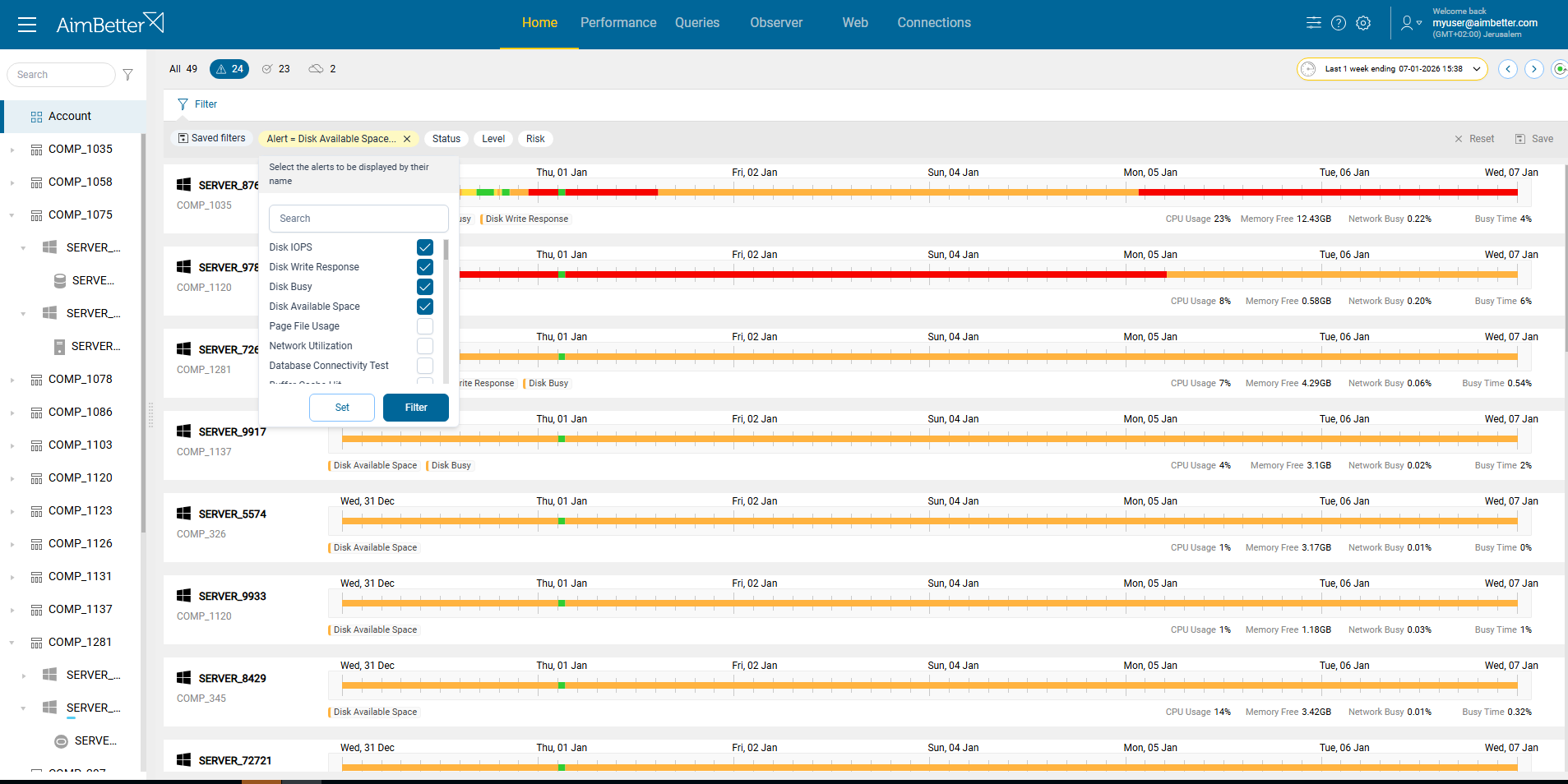
Imagine a disk usage alert that appears sporadically on one of your servers. With the new time range and filter across servers, you can look back over the last week’s alerts related to Disk issues to see if the issue is recurring.
Armed with this full context, the admin can confidently schedule proactive disk cleanup or capacity expansion, adjust I/O-heavy workloads, and prevent performance degradation and unexpected outages.
Extended Time Range and Focused Filters for Actionable Insights
Combining the extended time range with these cross-server filters makes it easier to turn data into action. Let’s see some interesting use cases.
CPU optimization: Filter active CPU alerts over the past month. Performance engineers can identify which queries or processes consistently overload the CPU, allowing targeted query optimization or workload redistribution.
Disk maintenance: Filter critical disk alerts across servers for the past month. System admins can prioritize servers for disk cleanup, expansion, or backup scheduling, preventing downtime before it impacts operations.
Security audits: Filter risk-level alerts over weeks to see patterns. Security teams can track recurring suspicious activity, identify potential vulnerabilities, and plan patching or access control adjustments proactively.
Alert Breakdown
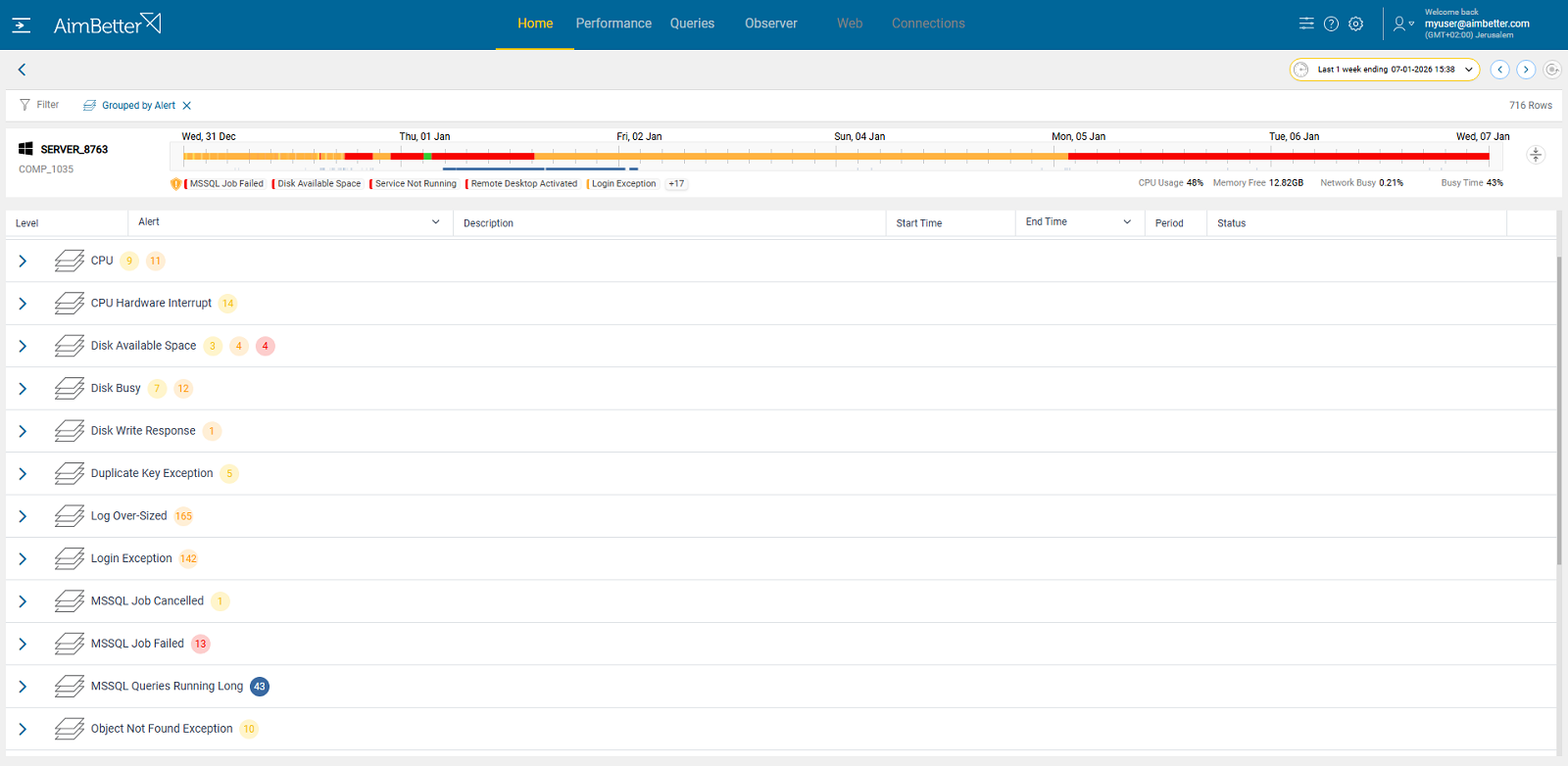
With alerts grouped by name and severity (Critical, Medium, Low, Informational), you get a clear view of the most pressing issues, helping teams focus efforts where they have the greatest impact.
With its extended time range and cross-server filters, AimBetter enables professionals to analyze patterns, plan targeted improvements, and prevent recurring issues, turning alert data into actionable, context-rich insights.